 Mario Gutiérrez

Too many people, not enough licenses, and a CRM that had to stay clean. Here's how one HubSpot custom object fixed all three for a B2B maritime company.
How do you know if your sales efforts are working? How can you streamline them across a large organization? And how can you customize your CRM to empower you?
What Is a HubSpot Custom Object, and
What Is It Used For?
A custom object is a record type you create in HubSpot to track something the standard objects weren’t built for. Think about custom objects the same way you think about contacts, companies, deals, and tickets: each one is its own thing. The only difference is that you can customize a custom object however you like, instead of using HubSpot’s default object types. You define its properties, associate it with your other records, and use it in workflows and reports just like a native object. Companies use them to track things like vessels, equipment, properties, and shipments, or in this case, every customer meeting. Custom objects are extremely useful if you’re looking to customize your CRM past HubSpot’s standard setup. Just keep in mind they require an Enterprise subscription.
How Customizable Is HubSpot?
More than most teams realize. Many companies first choose HubSpot for inbound marketing, but its CRM can do far more. Between custom objects, custom properties, forms, workflows, and team permissions, HubSpot can be shaped for almost any business process. The real limit is usually how the portal was set up, not the platform itself. Here's a real example.
Most of the meetings that drive revenue for one of our clients were invisible to leadership. They ended up as notes buried on contact records, hard to find and impossible to report on. The company is a B2B maritime services group with five brands under one roof, serving oil and gas companies and the ships that move their cargo. Its teams run a constant stream of customer visits, port calls, and sales meetings.
Leadership wanted every meeting captured accurately and reported in one place. They also couldn't afford bad data creeping into a CRM they had just cleaned up.
Here's how BrandExtract's HubSpot Solutions Practice designed a system that lets anyone log a meeting without a HubSpot login, checks the data before it touches the CRM, and gives leadership a comprehensive view of everything. We call it the Holding Cell.
The Challenge: Tracking Field Meetings Across Five Maritime Brands
Their goal was simple. Getting there wasn't, because the standard setup is designed for teams where the people taking meetings are the people using the CRM.
- Meetings happen at the dock, not at a desk. In maritime and energy, the people closest to customers are on vessels, at terminals, and out on port calls, working on tight and unpredictable schedules. They need a fast, simple way to report a meeting, not another system to log into.
- Visibility. A large group of field and operations people take meetings, far more than the company has HubSpot licenses for. Playbooks, HubSpot's tool for structured meeting notes, is built for licensed reps, so it couldn't reach the people doing the work. And when logging a meeting isn't easy, it doesn't happen, leaving leadership guessing about activity across five brands.
- Reportable data. Leadership didn't want meeting notes buried in free text. They wanted answers they could filter, count, and compare, such as how many customer visits each brand had last quarter. The standard meeting log is made for quick notes on a timeline, so this called for a different approach.
- Data they could trust. Since their reps meet the same customers regularly, any setup that stored the latest meeting on the contact record would quietly erase the one before it. And when a large group of people with no CRM training submit forms, typos and duplicates occur. Letting that flow straight into a database we had just cleaned up would undo the work.
- Five brands, one portal. Each operational team should only see its own customers, while the shared sales team needs access across brands. Every piece of the build had to honor that.
The Fix: A HubSpot Custom Object That Stages Every Meeting
We worked with what the client already established, combined several HubSpot tools in ways they aren't usually combined, and pushed the platform further than most teams think it can go.
Instead of forcing meeting data directly onto contacts and immediately updating and overwriting previous meeting updates, we built a custom object in Sales Hub Enterprise that acts as a holding cell. Every meeting becomes its own record there first, with custom properties and associations to the right contacts and companies. Only after leadership reviews and approves the custom object meeting records do workflows update the real CRM records.
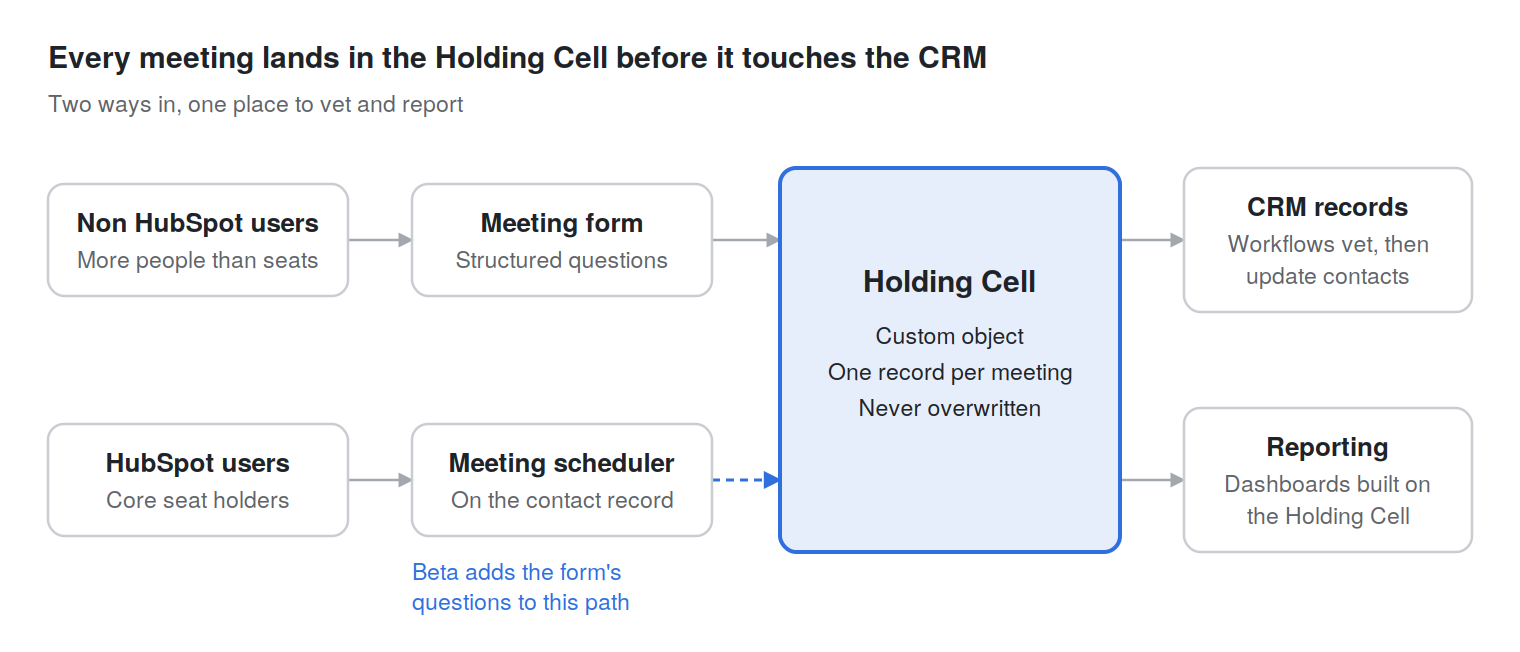
Here's what thinking outside the box looked like:
- A custom object became a quarantine zone. Custom objects are meant to model business data like vessels or properties. We turned one into a staging area where data has to be approved before making its way into the CRM.
- Core tools stood in for Playbooks. Forms, custom objects, and workflows, wired together, bring structured meeting questions to everyone in the company.
- A form became a login. Each submission carries everything a logged-in rep would enter, so the whole team effectively works in HubSpot without ever opening it.
- We partnered with HubSpot on the last piece. The final gap called for a feature still in beta. We brought the use case to HubSpot's product team, and they welcomed the client into the program.
The Results: Every Meeting Captured, Nothing Overwritten
The client now has a meeting logging process that works for everyone. Every meeting is captured, nothing is overwritten, and leadership reports on all of it from one place.
We piloted the flagship brand, with three sister brands ready to follow. And with the client now in HubSpot's meeting scheduler beta, meetings booked by HubSpot users will include the same questions as everyone else's.
If you looked at their portal today and tried to apply it to your business, it simply wouldn’t work. It’s built around their needs, not yours. Now imagine everything you could automate and accomplish with your own version of the Holding Cell.
Signs Your Company Needs Custom Object Work in HubSpot
- Your sales team or employees are meeting with customers, but don't have a HubSpot login
- Leadership asks about customer activity and gets a different answer from each team or brand.
- Important meeting details live in emails, notes, or someone's head rather than in fields you can report on.
- Data you care about keeps getting overwritten because it lives in contact properties.
- You've cleaned up your CRM before, only to watch it get messy again.
- You feel like your CRM could be doing more to help you reach your goals, and there’s still more juice to squeeze.
HubSpot Customization for Complex B2B Teams
The Holding Cell is one example of a bigger idea: HubSpot works best when it's built around how your business actually runs. That's the focus of BrandExtract's HubSpot Solutions Practice, and a big part of how we approach digital marketing for B2B companies. We take on the HubSpot work that doesn't fit a template, including:
- Custom objects and data models built around the way your business operates
- Workflow architecture and automation for complex, multi-step processes
- Multi-brand and multi-team portals with the right visibility for every team
- CRM cleanup and data quality systems that keep your database trustworthy
- Reporting and dashboards that give leadership one clear view
Whether you're just getting started or you've outgrown the way your HubSpot account was first set up, we'll help you get more out of the platform you already have and connect it to a stronger Inbound marketing Strategy.